How to Choose the Right HRMS for a Small Business in India: 12 Features to Check Before You Buy
How to Choose the Right HRMS for a Small Business in India: 12 Features to Check Before You Buy
Managing employees becomes increasingly complex as a business grows. What starts with a simple spreadsheet for employee details can eventually turn into multiple files for attendance, leave requests, salary calculations, employee documents, and payroll records.
When these processes are managed separately, even routine HR tasks can consume valuable time. Information may become difficult to track, approvals can get delayed, and preparing accurate payroll can require considerable manual effort.
This is where a Human Resource Management System (HRMS) can help.
An HRMS brings employee information and HR processes into a more organized system, helping businesses manage their workforce efficiently. However, not every HRMS offers the same capabilities, and choosing the wrong system can introduce unnecessary costs or leave important business requirements unmet.
So, how do you choose the right HRMS for your business?
Let's explore the essential features, practical considerations, and questions every small or medium-sized business should evaluate before selecting an HR management solution.
What Is an HRMS?
A Human Resource Management System, or HRMS, is software that helps businesses manage employee information and HR operations through a centralized platform.
Depending on the solution, an HRMS may include:
- Employee information and document management
- Attendance and working-hour tracking
- Leave requests and approval workflows
- Payroll processing and salary records
- Employee self-service
- HR reports and workforce analytics
- Role-based access and administrative controls
Instead of maintaining separate spreadsheets and disconnected tools, businesses can manage supported HR activities within a unified system.
For a growing company, this can improve visibility, reduce repetitive administrative work, and make employee information easier to maintain.
However, the objective is not simply to digitize existing paperwork. The right system should also support your company's workflows, policies, and future growth.
12 Essential HRMS Features to Check Before Buying
1. Centralized Employee Information
Employee information is the foundation of an effective HR management system.
Look for a solution that allows authorized users to maintain employee profiles containing relevant details such as:
- Employee ID and department
- Designation and employment details
- Contact information and emergency contacts
- Joining date and employment status
- Bank and payroll-related information, where required
- Employee documents and qualifications
The system should make it easy to search, update, and retrieve records without maintaining multiple versions of the same information.
What to check: Can you maintain complete employee records, control who can access sensitive fields, and retrieve information when required?
2. Attendance Management
Attendance tracking affects workforce visibility, leave calculations, and payroll preparation.
Depending on your operational needs, an HRMS may support attendance through manual entry, web-based check-in, mobile applications, biometric integrations, or dedicated attendance kiosks.
Useful capabilities include:
- Employee check-in and check-out
- Daily attendance records
- Late arrivals and early departures
- Working-hour calculations
- Attendance corrections and approvals
- Monthly attendance summaries
Some businesses may also require shift management, overtime tracking, location restrictions, or integration with existing attendance devices.
What to check: Does the attendance process match your working hours, shifts, approval rules, and employee work arrangements?
3. Leave Management
Managing leave through messages, email, and spreadsheets can make it difficult to determine employee availability and leave balances.
A suitable HRMS should support your organization's leave policies and approval process.
Look for features such as:
- Configurable leave types
- Leave balances and entitlement rules
- Leave applications and approvals
- Leave history
- Team leave visibility
- Holiday calendars
- Weekly-off and holiday handling
An important consideration is how the system calculates leave when an absence includes weekends or public holidays.
The software should apply your configured policy correctly rather than automatically deducting every calendar day.
What to check: Can you configure leave policies, approval levels, holiday calendars, and the rules used to calculate leave deductions?
4. Payroll Management
Payroll is one of the most important areas to evaluate because errors can affect employee payments, accounting records, and statutory compliance.
Depending on the product, payroll features may include:
- Salary structures and components
- Earnings and deductions
- Attendance-linked calculations
- Leave and loss-of-pay adjustments
- Payroll review and approval
- Payslip generation
- Payroll reports and historical records
- Salary revisions and correction workflows
For businesses operating in India, evaluate support for applicable requirements relating to provident fund (PF), employee state insurance (ESI), professional tax, tax deductions, and other statutory obligations relevant to the organization.
The applicability and calculation of these requirements depend on factors such as employee eligibility, salary structure, establishment details, location, and current legislation.
Do not assume that every HRMS automatically calculates every statutory component correctly.
What to check: Does the system support your salary structure, applicable statutory rules, payroll approval process, and a traceable method for correcting payroll errors?
5. Employee Self-Service
Employee self-service reduces the need for HR staff to handle every routine request.
Depending on the system, employees may be able to:
- View their profiles
- Apply for leave
- Review attendance
- Check leave balances
- Access payslips
- Update permitted personal information
- Submit requests for corrections
The system should clearly distinguish between information employees can update themselves and information that requires administrative approval.
What to check: Can employees complete common HR tasks without unnecessary back-and-forth with the HR team?
6. Document and KYC Management
Employee records often include important documents such as identity proofs, educational certificates, employment records, and other supporting documents.
An HRMS with document management capabilities can help organizations maintain these records in an organized manner.
Useful features include:
- Document uploads linked to employee profiles
- Document categories
- Access restrictions
- Document verification status
- Expiry tracking where applicable
- Controlled document downloads
Sensitive information requires particular attention. Identity documents and financial information should only be accessible to authorized personnel.
What to check: Where are employee documents stored, who can access them, and how are they protected, retained, and deleted when no longer needed?
7. Configurable Approval Workflows
HR processes frequently require approvals.
For example, a leave request might need approval from a reporting manager before HR receives the final record. A payroll correction may require a different approval path.
Look for configurable workflows that support:
- Leave approvals
- Attendance corrections
- Employee information changes
- Payroll review
- Designated approvers
- Pending-request visibility
- Approval history
The exact workflow should reflect your organization's responsibilities rather than forcing every request through the same process.
What to check: Can the system define appropriate approvers and maintain a clear history of important decisions?
8. HR Reports and Analytics
A good HRMS should help you understand your workforce without requiring manual consolidation of multiple spreadsheets.
Useful reports may include:
- Employee headcount
- Attendance summaries
- Leave utilization
- Payroll summaries
- Department-wise employee information
- Employee joining and exit records
- Pending approvals
Report availability varies between products, so identify the reports your organization actually needs.
Export functionality can also be useful when information must be shared with authorized stakeholders or used in other business processes.
What to check: Can you generate reliable reports for your HR, payroll, and management requirements without repeatedly preparing them manually?
9. Security and Role-Based Access
An HRMS stores sensitive employee and payroll information. Security should therefore be evaluated alongside functionality and pricing.
Important controls include:
- Role-based permissions
- Secure authentication
- Appropriate password and session controls
- Protected data transmission
- Secure document storage
- Backup and recovery procedures
- Audit logs for important actions
- Procedures for removing access when employees leave
For example, an employee should not automatically have access to another employee's salary information, and a manager may need access to team attendance without needing access to every confidential HR document.
Ask vendors how their system protects data both in transit and at rest, how backups are handled, and how security incidents are managed.
What to check: Can access be restricted according to job responsibilities, and can the vendor explain its security, backup, and recovery practices?
10. Integrations With Existing Systems
Businesses may already use accounting software, attendance devices, biometric systems, or other business applications.
An HRMS should be evaluated against the integrations you actually need.
Potential integration requirements include:
- Biometric attendance devices
- Accounting and finance systems
- Banking or payment workflows
- Email notifications
- Existing employee databases
- Other internal business applications
Do not assume that an integration is available simply because a vendor supports APIs. Check whether the specific integration exists, whether additional development is required, and whether extra charges apply.
What to check: Can the HRMS connect with your current systems, and what are the costs and limitations of doing so?
11. Pricing and Scalability
A system that suits a small team today should also be evaluated for the way your organization may grow.
HRMS pricing models can include per-employee subscriptions, fixed monthly plans, feature-based packages, implementation charges, or additional fees for specific integrations.
When comparing prices, consider the total cost rather than the headline subscription alone.
Evaluate:
- Monthly or annual subscription
- Employee limits
- Included modules
- Setup and migration charges
- Training and support
- Additional integration costs
- Data export and exit options
- Pricing changes as employee numbers grow
A lower-priced plan may be sufficient for a business that needs only employee records and leave management. A company with more complex payroll, approval, and reporting needs may require a broader package.
What to check: What will the system cost at your current employee count and at your expected employee count over the next few years?
12. Vendor Support and Implementation
Selecting an HRMS is not only a software purchase. It is also an implementation decision.
The transition may involve employee data migration, policy configuration, payroll setup, user training, and changes to existing HR processes.
Before committing, understand the vendor's implementation approach.
Ask about:
- Data migration assistance
- Initial configuration
- User training
- Support channels and response expectations
- Bug fixes and product updates
- Backup and recovery responsibilities
- Contract terms and data portability
A well-designed system can still create difficulties if it is poorly configured or employees do not understand how to use it.
What to check: Will the vendor help you move from your current process to the new system, and what support will be available after implementation?
HRMS vs Spreadsheets: Which Is Better for a Growing Business?
Spreadsheets remain useful for many simple tasks. The challenge is that managing multiple HR workflows through separate files can become increasingly difficult as the number of employees and processes grows.
| Area | Spreadsheets and manual processes | HRMS |
|---|---|---|
| Employee records | Often maintained across multiple files | Can be centralized |
| Attendance | Manual updates or separate tools | Can be integrated into HR workflows |
| Leave management | Requests and balances may require manual updates | Can support configured leave rules and approvals |
| Payroll preparation | Depends heavily on manual calculations and checks | Can automate supported calculations and workflows |
| Approvals | Often handled through messages or email | Can provide structured approval workflows |
| Reporting | Frequently requires consolidation | Can generate supported reports |
| Access control | Depends on file-sharing practices | Can offer role-based permissions |
| Scalability | Manual effort may increase with complexity | Can support more structured processes as the business grows |
An HRMS does not eliminate every error or administrative task. Its benefits depend on the quality of the system, configuration, data, and internal processes.
The right choice is the one that meets your operational needs at a reasonable total cost.
How to Choose an HRMS Based on Your Business Size
There is no single HRMS configuration that works for every organization.
Small businesses with straightforward HR requirements
If your organization has a small team and simple policies, prioritize:
- Employee information management
- Attendance and leave tracking
- Basic approval workflows
- Easy-to-use employee access
- Affordable, transparent pricing
Avoid paying for modules you are unlikely to use.
Growing businesses with more structured HR operations
As employee numbers increase, consider:
- Configurable approval hierarchies
- Attendance and leave automation
- Payroll integration
- Employee document management
- Department-wise reporting
- Role-based access controls
At this stage, consistent processes and reliable reporting become particularly important.
Businesses with complex payroll and workforce requirements
Organizations with multiple locations, shift patterns, or more complex salary structures may need:
- Advanced attendance and shift rules
- Detailed payroll configuration
- Applicable statutory calculation support
- Integration with other business systems
- Detailed audit trails
- Stronger administrative controls
- Implementation and support assistance
Evaluate these capabilities against actual requirements and confirm which features are available in the proposed plan.
HRMS Evaluation Checklist: Questions to Ask Before You Buy
Use this checklist when comparing HRMS vendors.
- Can the system maintain centralized employee records?
- Does it support our attendance and working-hour rules?
- Can leave policies, holidays, and approval workflows be configured?
- Does it support our payroll structure and applicable statutory requirements?
- Can employees access the information and services they need?
- Can employee documents be stored with appropriate access restrictions?
- Does the system maintain approval histories and audit records?
- Are the required reports and data exports available?
- Are security, backup, and recovery practices clearly explained?
- Can the system integrate with our existing applications or devices?
- Is the total cost clear, including setup and additional modules?
- Does the vendor provide adequate implementation and ongoing support?
Compare vendors using the same questions. This makes it easier to evaluate actual differences rather than choosing a system based only on a demonstration or advertised feature count.
Why Businesses Should Evaluate an Integrated HRMS
When employee information, attendance, leave, and payroll processes are disconnected, HR teams may need to enter the same information repeatedly or reconcile differences between systems.
An integrated HRMS can reduce these disconnected steps by bringing supported processes into one platform.
For example, attendance records may feed into monthly attendance summaries, approved leave may be reflected in leave balances, and relevant attendance information may be used during payroll preparation.
However, these connections depend on the software's features and configuration. Payroll calculations and salary changes should still go through the organization's required validation and approval process.
The objective is to establish a reliable workflow in which information moves between connected HR processes with less manual effort and better traceability.
Explore MYWE HRMS for Your Business
Choosing an HRMS should begin with understanding your organization's requirements, not selecting the software with the longest feature list.
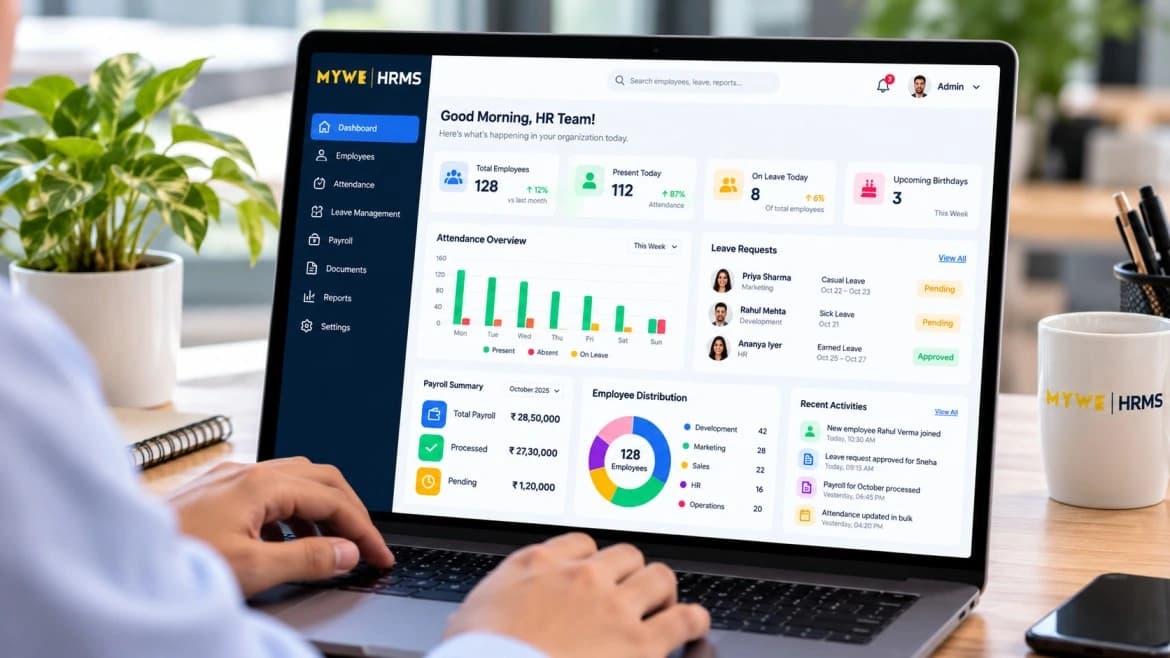
MYWE HRMS is a web-based human resource management solution developed by MYWE Technologies. It is designed to bring key employee management activities into a more organized digital workflow.
Depending on your requirements and the modules available in your selected plan, an HRMS can help organize employee records, attendance, leave management, and payroll-related processes.
If your business is moving away from spreadsheets or looking to improve its existing HR workflows, explore MYWE HRMS to understand whether it fits your organization's needs.
Looking for an HRMS for your business?
You can also contact MYWE Technologies to discuss your requirements and the right approach for your organization.
Frequently Asked Questions
1. What is the best HRMS for a small business in India?
The best HRMS depends on your employee count, HR policies, payroll requirements, budget, integrations, and security needs. Compare available features and total cost, and evaluate the system using your actual workflows before making a decision.
2. Is HRMS software useful for a company with fewer than 20 employees?
Yes. Even a small business may benefit from organized employee records, attendance tracking, leave approvals, and structured payroll preparation. Whether a dedicated HRMS is worthwhile depends on the complexity of its operations and the cost of the available plans.
3. Can HRMS software automate payroll in India?
Some HRMS platforms support salary calculations, earnings and deductions, attendance-linked adjustments, payslips, and payroll reports. The extent of automation varies. Verify support for applicable statutory requirements and review the calculations before processing payroll.
4. What is the difference between HRMS and payroll software?
Payroll software primarily focuses on salary calculations, deductions, payslips, and payroll records. An HRMS generally covers a broader set of HR activities, which may include employee information, attendance, leave, approvals, and payroll.
The exact scope depends on the product and plan.
5. Is cloud-based HRMS software secure?
Cloud-based HRMS software can be secure when appropriate safeguards are implemented. Evaluate authentication, role-based access, encryption, backups, audit logs, data retention, and the provider's security practices rather than assuming that cloud hosting alone guarantees security.
6. How much does HRMS software cost in India?
Pricing varies by provider, employee count, included modules, implementation requirements, and billing model. Request a complete quotation that includes setup, subscriptions, integrations, support, and any additional charges.
7. How long does HRMS implementation take?
Implementation time depends on employee data quality, the number of modules, policy configuration, integrations, and training requirements. A straightforward deployment may be quicker than one involving complex payroll rules or multiple existing systems. Ask the vendor for a realistic implementation plan.
Final Thoughts
Choosing the right HRMS can help a growing business move from disconnected administrative tasks toward more structured and consistent HR operations.
Start by identifying the processes that consume the most time, documenting your essential requirements, and comparing available systems against those needs.
Pay particular attention to employee data security, attendance and leave rules, payroll accuracy, implementation support, and the total cost of ownership.
A suitable HRMS should not simply replace spreadsheets with another interface. It should make everyday HR work easier to manage while supporting the way your organization operates and grows.
If you are evaluating HR software for your organization, explore the capabilities of MYWE HRMS and identify the features that best match your business requirements.
Related Articles
 Artificial Intelligence
AI Observability: Why Monitoring AI Systems Is the Next Big Enterprise Challenge
 Artificial Intelligence
Edge AI vs Cloud AI: Choosing the Right AI Strategy for Your Business
 Artificial Intelligence